The assistant sits on your website and answers visitors’ questions from information you give it, such as your FAQ, office hours, and notes on who handles what. When a visitor wants a person, someone on your team picks up the same chat in a support portal, with the conversation so far in front of them.
It suits a business that answers the same questions every day, takes quote or callback requests through its website, or has a few people sharing the phones.
What you get
An assistant, and a portal for your team
The assistant
- Answers drawn from your own FAQ, notes and topic guides. For each question it gets only the guides that match.
- Office hours, your address and whether you’re open right now are answered by fixed rules built from your details.
- When the answer isn’t in your information, it says so and offers a person, a callback or your phone number.
- Requests taken step by step in the chat, read back, and emailed to your office once the visitor says yes.
- No requests for sensitive details such as ID, account or payment numbers.
- Plain-text replies that read well in a small chat window, on a computer or a phone.
The support portal
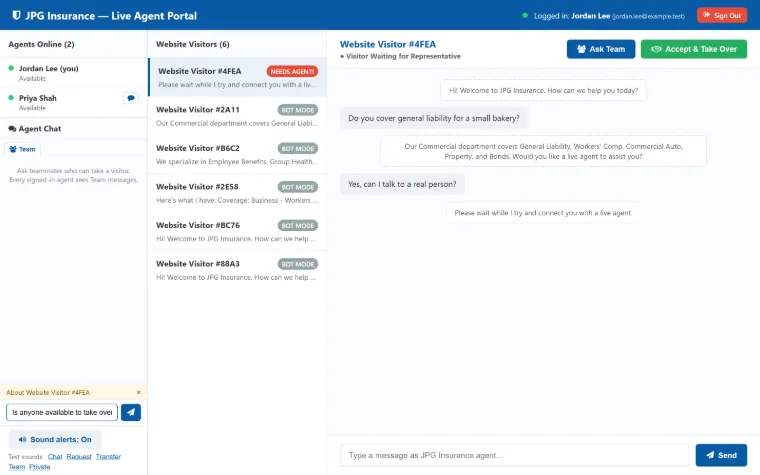
- Your team signs in and sees who’s on the site, including people who are only browsing.
- A sound alert when a visitor asks for a person, and an alert email if nobody answers in time.
- A button to take over a chat, with everything said so far in view.
- Ask the team to pick up a chat, or transfer it to a teammate.
- Online and away status, team chat, and private chat between two agents.
- A daily email with the previous day’s visitor log.
How it works
From a question to a person
A visitor asks
They open the chat on any page, on a computer or a phone, and type a question or tap a quick action.
The assistant answers
It answers from your information. If the answer isn’t there, it says it isn’t sure and offers a person.
Your team is alerted
A request for a person moves the visitor to the top of the portal list with a sound alert. If nobody answers in time, an email goes out.
A person takes over
Your team member sees the whole conversation and replies in the same window. When they end the chat, the assistant picks up again.
Try it
What could it do for you?
Each card matches a common situation to features we’ve already built. All of them were built for JPG Insurance.
You answer the same questions every day
- Answers from your FAQ, notes and topic guides. For each question it gets only the guides that match.
- Office hours, your address and whether you’re open right now come from fixed rules.
- Short plain-text replies that fit a small chat window.
- If the AI service is unavailable, short built-in answers keep the chat going.
Visitors ask for quotes or callbacks
- Requests taken step by step in the chat, with the same fields as your website form.
- Phone numbers and email addresses are checked, and the assistant asks again if one doesn’t look right.
- A read-back of every answer. Nothing is sent until the visitor says yes, and typing “cancel” stops it.
- Your office gets an email with every answer, and Reply goes straight to the visitor.
- A short form for visitors who would rather have someone call them.
Visitors often want to talk to a person
- A button to ask for a person. The assistant also understands requests like “real person” typed in the chat.
- Your team gets a sound alert, and the visitor moves to the top of the portal list.
- If nobody answers in time, an alert email goes to your team.
- Whoever takes over sees everything said so far, in the chat window the visitor already has open.
- If no one is free, the assistant takes the visitor’s name, phone, email and a short note for your team.
Several people share the chats
- Ask the team to pick up a chat, or transfer it to a teammate, who can accept or decline.
- After a transfer the visitor keeps the same window and history, so they don’t repeat themselves.
- Only the person who owns a chat can reply to it.
- Team chat for everyone signed in, and private chat between two people.
- Online and away status that stays accurate when the portal sits in a background tab.
You want a record of every visit
- A daily email with the previous day’s visitors and every conversation, with times and agent names.
- Totals for visitors, chats, requests for a person, chats your team handled, and quote requests.
- If the email fails, it tries again. If the service was down, it catches up on the days it missed.
You need answers you can stand behind
- It doesn’t ask for sensitive details such as ID, account or payment numbers.
- It’s told never to invent prices, staff or terms, and to offer a person when it’s unsure.
- A filter checks each reply before the visitor sees it. A reply with a dollar amount or a promise of coverage becomes a hand-off to a person.
- Each visitor gets a private chat ID, so nobody can open someone else’s chat.
- Limits on how fast messages and emails can be sent keep the chat from being misused.
Real example
Sarah, for JPG Insurance
JPG Insurance is an independent insurance agency in Las Vegas. Sarah, its chat assistant, answers from the agency’s own information, including eleven topic guides, and takes quote requests step by step in the chat.
Agents sign in to the portal with Google, see who’s on the site, and take over when a visitor asks for a person. Each night the office gets an email with the previous day’s visitors and conversations.
Questions
Common questions
What does the assistant answer from?
From information you give it, such as your FAQ, office hours, notes on who handles what, and guides on the topics visitors ask about. For each question it’s given only the guides that match.
What happens when it doesn’t know the answer?
It says it isn’t sure and offers a person, a callback, or your phone number. It doesn’t guess.
Can it make up prices or promises?
It’s told never to invent prices, staff or terms. For JPG Insurance we also added a filter that checks each reply before the visitor sees it. If a reply contains a dollar amount or a promise of coverage, the visitor gets a polite hand-off to a licensed agent instead.
What if nobody on my team is free?
The portal alerts everyone who’s signed in. If nobody answers in time (one minute by default in the JPG Insurance build), an alert email goes to your team. After another wait, the assistant tells the visitor no one is free and takes their name, phone, email and a short note, saved for your team.
Does it ask visitors for sensitive information?
No. It’s set up not to ask for details such as ID, account or payment numbers. In the JPG Insurance build, anything shaped like a Social Security number is replaced with “[removed]”.
What if the AI service goes down?
The assistant falls back to short built-in answers, so the chat never goes silent.
How does my team sign in to the portal?
At JPG Insurance, staff sign in with their company Google accounts, and only the company’s own accounts are accepted. What fits your team depends on the accounts you use, so we’d talk it through on a call.
How much does it cost, and how long does setup take?
It depends on your business: what the assistant needs to know, which requests it takes, and how your team will use the portal. Book a call and we’ll talk it through.
See what it could answer on your site
Tell us about your business and the questions you get most. We’ll reply by email within 48 hours to set up a call.