Some tasks follow the same steps every time. A request comes in, someone saves it, passes it to the right person, and writes it down. We set those steps up to run on their own, so requests reach the right person and nothing depends on someone remembering to pass them along.
It suits a business that takes requests through a website or chat and still moves them around by hand.
What you get
Requests that move on their own
- Website requests saved first, then emailed, so a mail problem doesn’t lose a lead.
- Requests from a chat or a form sent to the right people as a clear email, with Reply going to the person who asked.
- A short confirmation email to the person who asked.
- Website requests brought into the app your team works in, ready to act on.
- Alerts when a visitor or customer needs a person.
- Daily summary emails that send themselves, and try again if sending fails.
- Each step recorded with the time.
- Limits on how many emails one visitor can set off, so a form can’t flood your inbox.
How it works
From request to record
The same four steps run each time a request comes in.
-
A request comes in
Someone fills in a form on your website or answers questions in a chat. A spam check runs in the background.
-
It’s saved first
The request is stored privately on your site before anything else happens. If an email fails later, the request is still there.
-
The right person is emailed
They get the details as a clear email. Hitting Reply goes straight to the person who asked.
This time the email didn’t go. The request is already saved, so nothing is lost.
-
It’s logged
The request appears in the app your team works in, and each step is recorded with the time. A daily summary email can add it to the day’s totals.
If the email fails
The request is already saved, so it still shows in your team’s list. In a chat, the assistant tells the visitor the email didn’t go and gives your phone number, instead of pretending it was sent. A daily summary that fails to send tries again every 30 minutes.
Real example
Walker Home Pros and JPG Insurance
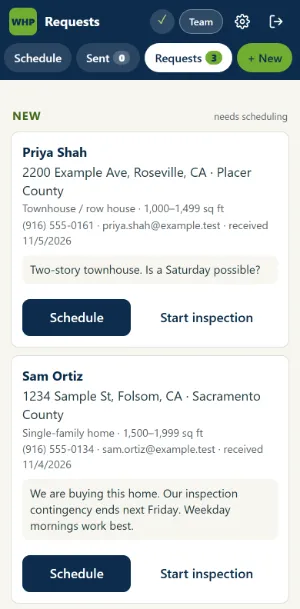
Walker Home Pros is a home inspection business near Sacramento. Every request from its website is saved in WordPress before the email goes out. New requests appear in the inspection app with a count, ready to schedule. Scheduling one fills in the appointment from the request and emails the customer a link to confirm. When they confirm, the owner gets a short note with their answers.
At JPG Insurance, quote requests taken in the chat reach the office as an email with every answer, and the agency gets an email each night with the previous day’s chat visitors.
Read the Walker Home Pros case study
Read the JPG Insurance case study
Questions
Common questions
What happens if an email doesn’t go out?
The request is saved before the email is sent, so it’s still in your list. In a chat, the assistant tells the visitor and gives your phone number instead.
Can requests go into the app my team already uses?
For Walker Home Pros, website requests go into the inspection app we built for the business. Whether we can connect to an app you already use depends on the app. Ask us on a call.
How do daily summary emails work?
They send themselves on a schedule. The JPG Insurance visitor log goes out shortly after midnight Pacific time with the previous day’s totals and conversations. If sending fails, it tries again every 30 minutes, and if the service was down it catches up on the days it missed.
Can someone use a form to flood our inbox?
Limits stop that. Website forms limit how often one visitor can send. The JPG Insurance chat also caps how many emails one visitor can set off in an hour, and how many go out in total.
What kinds of tasks can be automated?
Steps that run the same way each time, such as passing on requests, sending confirmations, alerts and daily summaries. Tell us what eats your week and we’ll say whether it fits.
How much does it cost, and how long does it take?
It depends on the steps involved and where your requests need to go. Book a call and we’ll talk it through.
What task eats your week?
Tell us the steps you repeat and where requests get stuck. We’ll reply by email within 48 hours to set up a call.